Markdown meets django CMS

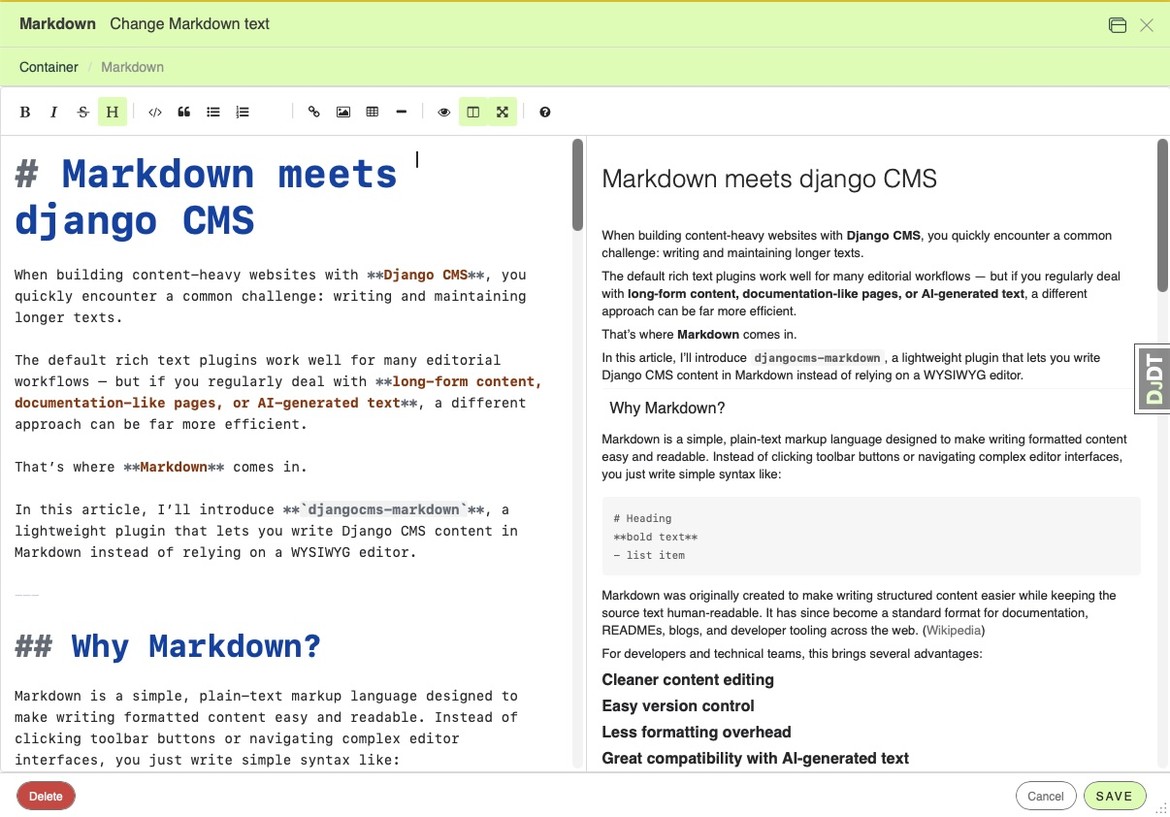
The default rich text plugins work well for many editorial workflows — but if you regularly deal with long-form content, documentation-like pages, or AI-generated text, a different approach can be far more efficient.
We've all been there. You ask Claude to draft a blog post, it hands you beautifully formatted Markdown -- headings, code blocks, tables, the works -- and then you paste it into your CMS rich text editor. Luckily with modern rich text editors formatting does not break any more. However, often additional, undesired formatting is included: footnotes to references, data attributes for the internal workings of the website. Stuff, that is entirely independent of the content and its meaning.
djangocms-markdown fixes this. It brings a proper Markdown editing and rendering pipeline to django CMS -- as a plugin, a model field, and a template filter.
The AI content problem (and solution)
Let's be honest: a growing share of draft content starts its life as Markdown. AI assistants output Markdown by default. Developers think in Markdown. Technical writers prefer it. And Markdown has a killer feature for content management: diffs that make sense. When you compare two versions of a Markdown document, you see exactly what changed. Try that with rich text HTML.
djangocms-markdown lets you keep content in the format it was created in. Paste AI-generated Markdown directly into the editor, tweak it, publish. No reformatting gymnastics.
What's in the box
Drop-in CMS plugin
Add a Markdown block to any django CMS placeholder. It nicely lives next to djangocms-text. The editor is EasyMDE -- toolbar, live preview, side-by-side editing, the whole package.
Out of the box, your Markdown renders with support for tables, fenced code blocks with syntax highlighting, footnotes, definition lists, abbreviations, table of contents, strikethrough, and task lists. No configuration needed.
MarkdownField for your own models
Building a blog? A knowledge base? A documentation system? Use MarkdownField anywhere you'd use a TextField:
from djangocms_markdown.fields import MarkdownField

class Article(models.Model):
    body = MarkdownField()
Store raw Markdown, access rendered HTML:
article.body              # "## Hello\n\nSome **bold** text."
article.body.rendered     # "<h2>Hello</h2>\n<p>Some <strong>bold</strong> text.</p>"
The admin form automatically gets the Markdown editor. Your templates automatically get sanitized HTML.
Smart object references
Here's a feature you won't find in most Markdown implementations. Link to any Django object by reference – both in the plugin and your custom markdown fields:
Read more on [our about page](ref:cms.page:42).
At render time, djangocms-markdown resolves ref:cms.page:42 to the page's actual URL by calling get_absolute_url(). Move the page? The link updates automatically. Delete it? The link degrades to plain text -- no broken links, no 404s.
And you don't have to memorize model names and primary keys. When djangocms-link is installed, a search popup appears right in the editor whenever your cursor lands inside a Markdown link. Type a few characters, pick the object, done. The reference is inserted automatically, and if the link text is empty, it's filled in with the object's name.
Template filter
Render Markdown anywhere:
{% load djangocms_markdown_tags %}
{{ article.body|render_markdown }}
Smart object references
Here's a feature you won't find in most Markdown implementations. Link to any Django object by reference:
Read more on [our about page](ref:cms.page:42).
At render time, djangocms-markdown resolves ref:cms.page:42 to the page's actual URL by calling get_absolute_url(). Move the page? The link updates automatically. Delete it? The link degrades to plain text -- no broken links, no 404s.
And you don't have to memorize model names and primary keys. When djangocms-link is installed, a search popup appears right in the editor whenever your cursor lands inside a Markdown link. Type a few characters, pick the object, done. The reference is inserted automatically, and if the link text is empty, it's filled in with the object's name.
Five minutes to get started
pip install djangocms-markdown
INSTALLED_APPS = [
    ...,
    "djangocms_markdown",
]
python manage.py migrate djangocms_markdown
The Markdown plugin shows up in the plugin picker. That's it.
Everything is configurable -- Markdown extensions, editor CDN, table CSS classes, sanitization rules -- but the defaults work well for most projects. The sanitizer shares its configuration with djangocms-text, so your existing TEXT_ADDITIONAL_TAGS and TEXT_ADDITIONAL_ATTRIBUTES settings carry over.
When does this make sense?
Not every content block needs Markdown. A short promotional banner with an image and a button? The rich text plugin is probably better.
But if you're working with:
- AI-generated drafts that arrive as Markdown
- Technical content with code samples, tables, and structured headings
- Long-form writing where you want speed and consistency
- Developer-facing documentation where your authors already know Markdown
- Content that lives in version control and needs clean diffs
...then djangocms-markdown is worth a look.
It doesn't replace your rich text plugin. It gives you a second option -- one that plays to Markdown's strengths.
Try it out
- Install:
pip install djangocms-markdown - Source: github.com/fsbraun/djangocms-markdown
- PyPI: djangocms-markdown
Feedback and contributions welcome.

